RSS Feed (xml)

Powered by Blogger

Showing posts with label MUSIC. Show all posts

Save Google Videos with an .AVI Extension

This is how you can save Google Videos in the .avi file format.
  • Find the video on Google, click the download link, then hit NO.
  • Next click the manual download link for the video.
  • Save it and open it in notepad.
  • If you haven't already turned "word wrap" on (format > word wrap). Copy everything between "url :" and "docid" and paste that in your browser.
  • Hit enter and a download should start.

Remember, sometimes some (few) Google Videos won't have the download link, in that case, I can't help you.

Play Music from CD-ROM without Computer

Here is a trick which will play CD in the CD-ROM without having a computer. This will work for the older CD-ROM which had 3.5mm Audio out Jack and can play only Audio CD [some support mp3 but no other format] [Best works with Creative 52X Multimedia CD-ROM also had an Infra-Red Remote and lots of buttons for play/pause, stop, etc].
You will need :
  • A CD-ROM with Audio Out 3.5mm jack.
  • A SMPS [Old AT SMPS which had a power switch to on the supply unlike ATX which needs motherboard to power on].
  • A power cable to power your SMPS.

How to do:
  • Connect the CD-ROM with SMPS.
  • Connect your speaker to the Audio jack of the CD-ROM or connect an amplifier for Bigger speaker, power it up, insert an audio CD.
  • Rock On!!

Fix-a-Scratched-CD


  • Clean the disc. Even if a CD isn’t actually scratched or scuffed, dust, oil, and other surface contaminants can prevent it from playing properly. Thus cleaning the disc should always be your first move. Run warm water over the damaged disc to remove dust. If there is stubborn dirt or grease on the disc, gently rub it with your finger while you are washing it, and use a gentle detergent or liquid soap (with the water) or rubbing alcohol (in place of water). Any time you 'rub or wipe a CD, you should do so by starting at or near the center of the disc and rubbing straight outward toward the edge' to prevent further scratching. Shake the water off and let the disc air-dry (do not dry it with a towel or cloth, and don't sun-dry it either).

  • Try to play the disc. Many times a good cleaning is all that is needed. If, however, problems persist after cleaning, try to play the disc in a different CD player. Some players handle scratches better than others; computer CD drives tend to be best.

  • Burn a new disc. If you can get the CD to work in one CD player - especially your computer’s - but not in others, try burning a new disc. The CD burner on your computer may be able to read the CD well enough to produce a perfect copy. You may wish to try this even if the CD doesn’t play correctly on the computer.

  • Locate the scratch. Actually repairing the disc will be easier if you can figure out where the offending scratch is. Visually inspect the CD’s playing surface for scratches or scuffs. Scratches that run perpendicular to the CD’s spiral - that is, those that run generally from the center to the rim - may not affect playing at all, and in any case are generally less damaging than those that roughly follow the direction of the spiral. If there are several scratches, but the CD only skips in one or two places, you may be able to approximate the location of the offending scratches based on which track skips. Keep in mind that the first track of a CD begins near the center, and the direction of play proceeds outward to the edge.

  • Polish the CD. Though counterintuitive, polishing a disc can repair a scratched CD by removing some of the outer plastic coating and thus making existing scratches shallower. A number of common household products can be used to polish the CD, but toothpaste — especially baking soda toothpaste — and Brasso are probably the most tried and true. You can also use a fine-grit polishing compound that's used for cars or hard finishes. Apply a small amount of toothpaste (must be paste, not gel) or Brasso to a soft, clean, lint-free (old undershirt) cloth: an eyeglass-cleaning cloth works well. Gently rub the cloth on the scratch or scuff in a radial motion, start at the center and rub out to the edge (like spokes on a wheel). Do this 10 or 12 times all around the CD. Rubbing in a circular motion can cause small scratches that throw off the laser tracking system in the player. Try to focus your efforts solely on the scratch or scratches you’ve identified (if possible). Polish in this manner for a couple of minutes, reapplying Brasso or toothpaste to the cloth as necessary. Be careful not to apply much pressure, although you will still be able to feel the cloth gently scratching the CD as it polishes.

  • Remove polishing product from disc. If you used toothpaste, rinse the disc thoroughly with warm water and let dry. Make sure to remove all of the toothpaste and let the disc dry completely before trying to play it. With Brasso, wipe off excess product and let the rest dry. Then, using a clean cloth, gently wipe disc again.

4800 Ringtones At one Place


Media Convert Master v8.1.1.2


Media Convert Master v8.1.1.2

Media Convert Master is a professional video converter, you can convert your video and audio files from one format to another. It supports multiform convert formats including AVI, MP4, 3GP, MPEG, MOV, WMV, RM, SWF, AAC, AC3, MP2, MP3, AMR, WAV, VOB and ASF. It is extremely professional converting software with fast conversion speed and high quality. It can let users enjoy their video converting.

Main Functions:
Video Conversion
Audio Conversion

Features List:
It can convert all formats to AVI, MP4, 3GP, MPEG, MOV, WMV, BM, SWF, AAC, AC3, MP2, MP3, AMR, WAV, VOB and ASF.

Adjustable edit profile to add or delete formats at your will.

Batch convert video formats.Supports any video formats user defined as the output.

You can customize video profiles video and parameters for output video.

Step by Step How to convert a file:

1. Click "Open" button to add the video files that you want to convert.

2. Click the desired Main Panel button to select a target format that you want to convert to.

3. Then click "Edit Profile" button to customize profile properties.

4. Set a valid output directory to save converted files before start converting. Click "Browse" button to select desired output directory or write valid output directory manually.

5. Click the " Convert" button to start your converting. There will be a new file in your selected output directory.
Supported Formats:AVI, MP4, 3GP, MPEG, MOV, WMV, RM, SWF, AAC, AC3, MP2, MP3, AMR, WAV, VOB and ASF.

Search Engine For Finding Sound Effects And Musical Instrument Samples

There are about a dozen Web search engines for searching the text, image, audio, or video files on the Web but FindSounds.com is one of a kind and is the only Web search engine devoted to finding sound effects and musical instrument samples.

FindSounds.com is a free site for finding sound effects and musical instrument samples on the Web. It is a Web search engine, like Google and AltaVista, but with a focus on sounds. It provides powerful features, yet is simple and easy to use, and suitable for all ages.

You can use these sounds effects in your presentations,websites or anywhere you want.

This website provides you whole lot of sound effects.

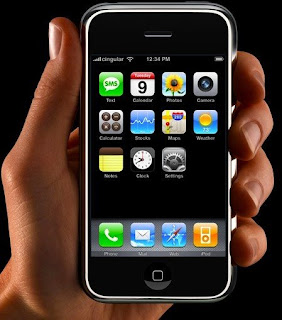
♥♥♥How to make your ipod into an IPHONE!, YEs you can CALL PEOPLE♥♥♥

Ok, Hello guys and whats up? Im here to inform you guys in how to make your Itouch into an Iphone. (this may seem like my other post i had yesterday but that post was a preview build (lol) ) Ok There Will be many steps in making your Itouch EXACTLY like an Iphone!

Now lets Begin:

All you need is a Jailbroken ipod touch and a wifi connection. It doesn't matter whether you have 1.1.1 or 1.1.2.Here's what you do.

1) Tap Installer
2) Tap Sources
3) Tap Edit (Top right of screen)
4) Tap Add (Top left of screen)
5) After http:// enter repo.us.to
6) Tap OK
7) Let the ipod do it's thing.
8)Tap Install
9) Two new folders should have appeared, iphone 1.1.1 Apps for... and iphone 1.1.2 Apps for...10) Tap whichever you need (1.1.1 or 1.1.2)
11) Install Apps as usual.
12) You will notice Maps and Mail have an additional file to install. Install this file first.

Thats it. It looks like a lot of steps but it's easy as anything.

Thats thanks to Emirates For posting those great tips. that you just read above.

NOW TO ADD A PHONE FUNCTION: (from ME) To use Voice of Ip with your ipod touch here are the steps.

1) Go to the Installer tap sources then edit and add like before: http://touchmods.net/rep.xml

Go to the install section and scroll all the way down and click on the Touchmods Folder. Install the Touchmods SIP VoIP Application. Once springboard restarted, you search for and click the green Touchmods logo.

2) You will need to register a SIP account. With your computer, you need to go to www.freecall.com (or any other host with sip) and You will need to download the freecall application to your computer and register for a free account. when you have that Installed and an account made, just make one call with the application from your comp to initiate the username.

3) To make calls in America you need to do this exactly you type in +1xxxxxxxxxx +1 takes you in America first 3 xx are your area code and the 7 other are you number. In the freecall application on your computer.

4) Turn on your Ipod touch and open the sip Voip app. click on account on the top left and type in your username and password and click save.

5) The registrar is the webiste you got the account from. If you used freecall.com this is will be your account, sip.voiparound.com and click save.

6) Click on phone on the top right and do they exact thing you did with the freecall app on your computer and punch in a phone Number (+1xxxxxxxxxx) and click call!!!!

7) You will call them and you can hear what they say, but to talk to them you need to buy or make a specific mic. To buy one for around $45 you can reserve one Right Here if you would like to do a project and make one the instructions are BLAH Here .

Upload Unlimited Songs At boomp3.com

Boomp3.com is the website where you can quickly upload and share mp3 and wma files.
The good thing about this website is that there is no upload limit.

The uploaded songs can also be easily embedded in your blogs or website from a piece of html code, and the player is also quite cool with a play, pause and volume buttons and the buffering speed for the songs is also quite good even at slower net speeds.
This is really a cool way of uploading and sharing your songs collection.
Related Links: boomp3.com

Free MP3 download site for Indian Music


If you want free mp3, this is the site. This site has Indian patriotic and inspirational MP3 audio. You can download this MP3 free.
The site is called GeetGanga. Geet Ganga is one stop resource for 100s of free patriotic and inspirational MP3 songs in over 10 Indian languages. Enjoy MP3 geet in Bengali English Hindi Kannada Malayalam Marathi Marwari Oriya Sanskrit Tamil Telugu and many more to come.

This is what their website Plan is.

Website Plan

  • Put up all the Sangh Geets Online
  • No limit on geet language
  • Include Lyrics of Geet in geet's language
  • Transliteration in English
  • Meaning in English

They need help with:

  • Collecting all the Sangh Geets
  • Editing existing geet audio to remove noise and clicks
  • Transcribing Geet in the local language using Unicode format

So if you have it in you. Check it out and contribute.

Here is the SITE LINK

: GeetGanga


If you are looking for downloading Marwari Songs then here is the link : Download Marwari Songs


This site above has list of Marwari Songs, Marwari Bhajans, Marwari Video songs and Movies.


Hindi Songs (MP3, RAM) Music Download


Bollywood Music Download - All types of Hindi Songs and Bollywood Music, Remixes

Music Download Old Hindi MP3 Download - Rare Old Hindi Songs By Classic Movie Club (Must)

Bollywood Music & Movies Portal - Site with lots of Pop Ups

Desi Music Download - Latest songs with pop-ups

HindiSongs.net - Free hindi music directory

Indian Melody - Melodious Indian Bollywood Music, Real Audio Songs and Music Links - Hindi Music Download

MusicIndiaOnline Hindi Section - The largest collection of Online Hindi Songs.


giitaayan - Hindi Songs Lyrics - giitaayan is a lyrics archive of Hindi songs, primarily from films but also from many non-film genres including Ghazal, Bhajan, Geet, and Pop. This collection is result of a collaborative, non-commercial and open Internet effort called iTrans Song Book (ISB)

NEW SONGS:

Watch Indian Television Channels Online for Free.


Television first came to India [named as ‘Doordarshan’ (DD) on Sept 15, 1959 as the National Television Network of India. The first telecast started on Sept 15, 1959 in New Delhi. After a gap of about 13 years, s second television station was established in Mumbai (Maharashtra) in 1972 and by 1975 there were five more television stations at Srinagar (Kashmir), Amritsar (Punjab), Calcutta (West Bengal), Madras (Tamil Nadu) and Lucknow (Uttar Pradesh). For many years the transmission was mainly in black & white.

In 1992, the government liberated its markets, opening them up to cable television. Five new channels belonging to the Hong Kong based STAR TV gave Indians a fresh breath of life. MTV, STAR Plus, BBC, Prime Sports and STAR Chinese Channel were the 5 channels. Zee TV was the first private owned Indian channel to broadcast over cable. A few years later CNN, Discovery Channel, National Geographic Channel made its foray into India. Star expanded its bouquet introducing STAR World, STAR Sports, ESPN and STAR Gold.

And now India has about couple hundred channels. But I think the mostly viewed channels are Zee, Sony, Star channels. Most of those who live in India don't care whether they can watch the Indian Television channels online or not but for those who live outside India really strives to watch these Indian channels.

I have seen lot of people searching for "free indian channels online" or how to watch indian channels online or if I want to watch zee cinema online or zee tv online or Tamil TV watch online where to go?

So here I am trying to compile the list of sites where you can watch these channels online.

  • www.live-from-bd.com : The site called "Live from Bangladesh". The site has list of all the famous Indian channels that you can watch online. Zee TV, Sony TV, Star One, Star Plus, Zee Cinema etc. The site doesn't require you to register. All you need is Windows Media Player 10, Real Player, VLC Media Player installed on your machine. You must be aware of Windows Media Player and Real Player. You can get VLC media player free, just google it and you will find it. Once you go to the website, you will see list of channels on the left. Click on the channel you want to see and you would see the screen with username and password information. The popup box will ask you to enter that information and you should be all set. Watch Zee Cinema Online, Watch Zee TV online, Watch Sony TV Online and enjoy.

Update on Live-From-bd.com - The site now requires you to register. So be prepared for that

  • www.idesitv.com: This site used to require registration but they have changed their layout and now its just simple page with list of channels URLs. Click on the channel and a popup window will open up. Same list of channels are available here. Less than what you get from the previous site. Few sites have voice issue. The voice and video moves in fast forward motion makes it sound funny. For e.g. Sony TV & Star One.
  • www.djzaki.com: I don't believe this site has online channels but you can watch videos clippings from these Indian Channels. This site requires registration.
  • www.nepalisite.com/tv : This site has only 5-6 channels but the quality is good and doesn't have annoying ads. It has Zee, Sony, Sony Max, Star Plus, Aaj Tak, IBN Live, Star One. I would rank this site as 2nd after live-from-bd.com. Watch Star Plus Online.
  • www.onlinemedia.in: Beware of this website. It does provide all these channels but has lot of popup ads and could have spywares. I would go to this site as a last option.

Updates On more players

  • www.cyberviewtv.com - This site has Hum TV, Apna TV (Punjabi), AJJ TV, Geo TV, DOOM TV, Star Utsav, Zee Punjabi, ETC Punjabi, Zee Marathi, Zee Gujarati and many more Indian channels online for free. I think this site has the most exclusive list of Indian channels online for free. It also doesn't have too many popup ads but the UI is little bit cluttered. It also has TV shows, Cartoon shows etc available for free.

Updates:
  • www.indiagalaxy.com -Just got a comment from a user about this new website. IndiaGalaxy.com is another website that streams Indian TV Channels. The site is pretty neat and it has a list of channels listed on the left and the player is on the right. You can watch Telugu channels, Zee Cinema, Zee TV, Sony, SET Max, Star Plus, Star One, Zoom India, Filmy and many more indian tv channels online for free.

I will update the list as and when I find out more players in this game. Till then enjoy watching your television online for free.

When you love television as much as we do there are times when you may want promotional products to show your support for your favorite stations. From personalized coolers to stress balls, we've got what you're looking for.


The KM Player

The KM Player plus lots of external codecs and skins included.

The KM Player is all in one media player covering various formats such as VCD, DVD, AVI, MKV, OGG, OGM, 3GP, MPEG-1/2/4, WMV, RealMedia, QuickTime, Flash Videos etc. It has an extra feature to play Incomplete/Damaged AVI file, Locked Media Files while downloading or sharing, Compressed Audio Album (zip, rar) and so on. It handles a wide range of subtitles and allows you to capture audio, video, and screenshots in many ways.

This is considered one of the best players than windows media player plus it is so light to play high def. MKV files with awesome audio displaying the actual channels, actual codec video and audio used, displaying full screen, actual screen controls, shortcuts right at your fingertips.

Download:

Code:
http://rapidshare.com/files/112064555/2008_codecs.players.converters.part1.rar
http://rapidshare.com/files/112078612/2008_codecs.players.converters.part2.rar


TotalMedia Backup & Record 1.5.9.13


ArcSoft TotalMedia Backup & Record™ offers a broad range of robust disc burning and backup features with an unsurpassed level of usability. Whether you need to make basic archival discs or restore documents, burn custom audio CDs or rip tracks with CDDB support or create DVD movies from files on your hard drive, you’re sure to do it quickly and easily. By combining power and simplicity, TotalMedia Backup & Record is the smart choice for both beginners and enthusiasts alike.


Download:-
Code:
http://rapidshare.com/files/113240895/TotalMedia.Backup.and.Record.v1.5.9.13.rar


GoldWave 5.25


GoldWave is is a top rated, a comprehensive digital audio editor. GoldWave is ideal for people who work with audio for CD editing, archive restoration, speech analysis, radio and TV, Java and Web pages, games, or just for fun. You can use it to make everything from elaborate answering machine messages to professional, high quality CD audio content.


Features:
  • Play, edit, mix, and analyze audio
  • Record audio from cassettes, vinyl records, radio, etc. through your computer’s line-in
  • Record dictation through a microphone or play dictation back at a slower speed for transcription
  • Record and edit audio for pod casting
  • Apply special effects, such as fade, equalizer, doppler, mechanize, echo, reverse, flanger, and more.
  • Digitally remaster and restore old recordings with noise reduction and pop/click filters.
  • Make perfect digital copies of audio CD tracks using the CD Reader tool and save them in wma, mp3, ogg files.
  • Edit music for dance programs, figure skating, gymnastics.
  • Analyze human speech, bird song, whale song.
  • Demonstrate digital signal processing with filter effects and the expression evaluator tool.
  • View a variety of real-time visuals and VU meters.
  • Convert files to/from different formats, such as wav, wma, mp3, ogg, aiff, au, vox and even raw binary.

Download:-
Code:


CLICK HERE FOR DOWNLOAD LINK


MemTurbo 4.1.0331


MemTurbo 4 is a highly acclaimed and powerful application that can optimize memory and manage your computer's cache. Your applications will be able to use memory without forcing Windows to go to the hard drive. This can lead to an increase in an application's performance, lowering the application's response time.Increase your computer applications memory today to save time and money. Why spend thousands of dollars on a new PC when MemTurbo has the ability to make better use of your computers memory resources? Memory upgrades may become unnecessary when you can optimize the performance of physical memory you already have!


Download:-

Code:

http://rapidshare.com/files/110693757/14-_MemTurbo_4.1.0331_BY_aBo_3AnKpOoT.rar

POPULAR DOWNLOADS

.